

Commercial Kitchen Equipment Troubleshooting: When to Stop
Commercial kitchen equipment troubleshooting is the process of identifying a symptom, checking its likely causes and deciding the next safe action when a piece of equipment stops working as it should, and the numbers that settle most of those decisions are fixed: chilled food held at 5°C or below, hot food held above 60°C, and a cooking core of at least 75°C. A unit that misses those figures has failed its job, whether or not the display on the front agrees with the probe in the food.
The call usually lands mid-service. The pass is full, someone says the upright fridge feels warm, the panel still reads 3°C, and the door has been open through prep. Nobody on the floor is sure whether to move the stock, ring a technician or push on until close. That uncertainty is the expensive part, because the wrong call either burns a service or puts food on the pass that shouldn't be there.
Sorting every symptom into four outcomes before anyone reaches for a tool changes the whole conversation: a safe operator check, a cleaning job, a technician call, or stop-use. This is written for the person making that call at 6pm with a full rail, not for the technician who arrives the next morning.
What Commercial Kitchen Equipment Troubleshooting Covers
Four separate jobs get lumped under troubleshooting, and mixing them up is where kitchens lose time, money and occasionally a delivery of stock.
- Safe operator checks. Confirming the setting, reading the fault message on the panel, checking that the door latches, the pan sits flat, the plug is fully home and the right programme is selected. Most calls start here and a fair share end here too.
- Routine cleaning and maintenance. Clearing filters, wash arms, drain strainers and condenser areas exactly as the manual describes. A blocked wash arm mimics a failed dishwasher and costs nothing to put right.
- Fault diagnosis. Anything inside a sealed refrigeration circuit, a gas fitting, internal wiring or an element belongs to a qualified technician. In New Zealand, prescribed electrical work includes maintaining electrical appliances, so covers stay on and interlocks stay intact.
- Replacement decisions. When repair cost, age, parts availability and downtime together outweigh the price and lead time of a new unit.
Most service calls begin in the first bucket and finish in the third. The callout charge doesn't change based on how much checking happened first, so the free steps are worth doing properly.
One item earns its place in the first bucket permanently: a probe thermometer that reads true. Food Standards Australia New Zealand requires businesses that prepare, handle or sell potentially hazardous food to hold a thermometer accurate to ±1°C, as set out in Ministry for Primary Industries food-safety guidance. A panel display is an indicator, not a measurement.
The line that matters: equipment that is running is not the same as equipment that is running safely.
That distinction sits behind every section that follows. Food protection and staff safety come before restoring service quickly, every time.
Common Faults, Stop-Use Triggers and Safe First Checks
An oven can appear to run normally while leaving food above a safe temperature. That is the fault to treat most seriously: check the food, not just the display, and stop serving affected food until its safety is established. Gas odour, smoke, electrical faults and immediate injury risks also take priority over routine troubleshooting.
The 2025 Energy Safety report from WorkSafe records 38 notifiable natural-gas accidents involving cookers or ovens, 17% of all notifiable natural-gas accidents. These resulted in one death and injuries to 14 people. The same report records 139 of 462 notifiable LPG accidents involving cookers or ovens; among those 139 accidents, 19 people died and 130 were injured. It also records 3 notifiable and 18 non-notifiable electrical accidents in New Zealand in 2025. The numbers justify a strict order of operations.
The first-pass table for staff on shift
Start with accessible controls, displayed messages, operating settings and steps approved in the manufacturer's instructions. Do not use tools, remove covers or touch gas fittings.
| Equipment | Common symptom | Safe initial checks | When to call a technician |
|---|---|---|---|
| Commercial refrigerator | Food not holding 5°C or below | Compare the display with a probe reading in the food; check door seals, shelf loading and condenser clearance | Food remains above 5°C after checks, ice builds up repeatedly, or compressor noise changes |
| Freezer | Ice build-up or soft product | Check door closure, defrost setting, loading and open vents | Cabinet does not reach its set temperature after checks |
| Ice machine | Slow production or no ice | Check the water supply, filter condition, bin level and condenser clearance as the manual describes | Machine stops, an error code returns, or a water or drain fault repeats |
| Combi or convection oven | Not heating or cooking unevenly | Confirm the setting and preheat time; check rack spacing and door seal condition | An error code returns after permitted manual steps, or an electrical fault is suspected |
| Gas oven or cooktop | Delayed ignition or unstable flame | Check controls and isolation only; do not touch gas fittings | Delayed ignition, gas odour, yellow flame or soot |
| Fryer | Oil not reaching set temperature | Check thermostat setting, oil level, basket loading and whether the drain valve is closed | Thermostat or flame-failure fault repeats after a reset |
| Griddle | Losing temperature during service | Check thermostat setting, preheat time and plate cleanliness | Heating fails again after the manual's checks |
| Food processor or mixer | Not starting or unusual noise | Check that the bowl, lid and guard are fitted correctly; check the power switch | Burning smell, grinding, vibration or an interlock fault |
| Dishwasher | Dishes dirty or not drying | Check filters, wash arms, rinse aid, detergent level and loading | Machine does not fill, has a drainage fault, or shows an error code after manual checks |
| Ventilation or extraction hood | Reduced extraction or grease and smoke build-up | Check filters as the manual describes, clear make-up air openings and check the fan switch | No airflow, fan noise or suspected electrical fault |
Stop-use triggers
Stop and isolate equipment for any of these conditions. They are not faults for an operator to repair:
- Gas odour, at any strength.
- Yellow or unstable flame, or a flame that lifts off the burner.
- Delayed ignition, where gas builds before it lights.
- Soot on pans, walls or the appliance.
- Smoke from the appliance rather than the food.
- Scorched plugs or cords, or a burning smell from wiring.
- Water near electrical parts, including a leak beside a powered connection.
- Sparking at a switch, plug or element.
- Unexpected steam from an oven door or seal.
- A missing guard on a slicer, mixer or food processor.
If there is a gas smell, do not operate switches or create an ignition source. Keep people clear, ventilate if it is safe, and follow the site emergency procedure, including the gas line emergency safety steps. For other stop-use faults, isolate the appliance at its plug or isolator only if it is safe to reach. Fixed appliances should be installed and commissioned by qualified trades.
Three traps that catch experienced operators
A normal display can hide warm food. A sensor may drift, a probe may be poorly placed, or food in the centre of a tray may be warmer than the cabinet reading suggests. Check the food with a thermometer.
The same symptom can have different causes. Uneven oven cooking may come from a failed element, overloaded rack, bent tray or worn door seal. Dishwasher residue may point to dosing, water quality or a blocked filter.
Settings and loading can mimic a breakdown. Before calling for service, compare the selected programme with the job, check that vents are clear, and confirm trays or baskets are loaded as the manual allows. Stop if a safety trigger appears.
Refrigeration Checks That Start With Food Temperature
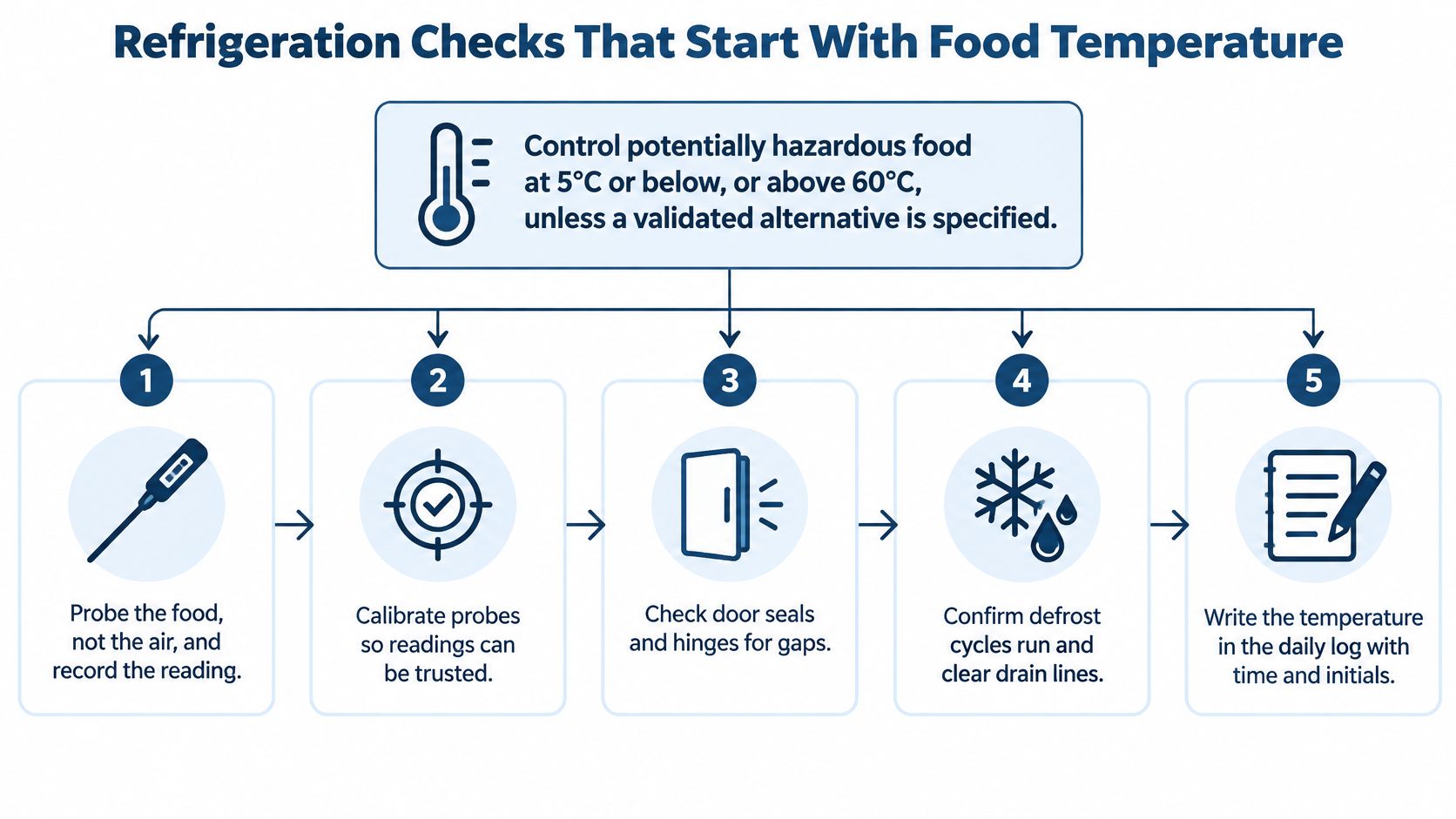
New Zealand food businesses must control potentially hazardous food at 5°C or below, or above 60°C, unless a supplier or manufacturer specifies another validated temperature, as the Ministry for Primary Industries guidance sets out. That single sentence gives a pass or fail mark that any staff member can apply without understanding refrigeration.
Checks that prove where the fault sits
- Take the reading with a probe, not the panel. Sanitise the probe, place it in the thickest part of the product and wait for the value to settle.
- Measure the centre of a container, not the air near the door. Warm air at the front of a cabinet tells you nothing about the middle of a 20-litre tub.
- Test the door seals with paper. Trap a sheet in the closed door and pull. If it slides out with no resistance, that gap is a warm-air path.
- Review loading. Overfilled shelves, trays pushed against the evaporator and blocked vents all hold warm air where food should be coldest.
- Clear the condenser and ventilation areas as the manual describes. A coil packed with kitchen grease and flour runs hot and loses capacity.
- Note the timing. A fault that only appears during peak service or straight after cleaning or defrost points at recovery capacity or airflow, not a failed compressor.
- Move stock above 5°C to a working unit and record the time, the reading and who moved it.
Two patterns turn up constantly. A cabinet reads 3°C on the display but 8°C at the centre of a tray after a delivery has been loaded warm and stacked tight. A reach-in with a torn seal at one bottom corner tests perfectly everywhere except the corner that matters.
Cooling is the other half of the job and it fails without obvious signs. The MPI cooling sequence requires food to drop from 60°C to 21°C within 2 hours, then from 21°C to 5°C within a further 4 hours, or be discarded, as set out in the MPI cooling guidance. Logging the product temperature at the two-hour and six-hour marks is the only way to know whether a blast chiller or a deep container is doing its job.
When to stop relying on the cabinet
If a unit can't hold 5°C or below after the checks above, stop relying on it and call a refrigeration technician. Operators shouldn't adjust refrigerant circuits or electrical components, and it's worth following the routine in this guide to commercial refrigeration maintenance between services.
Brands such as SKOPE and Atosa publish permitted checks and alarm interpretation in the model manual, and that document, not a forum thread, sets what staff should attempt.
Commercial Oven and Cooking Equipment Faults
An oven can reach its setpoint and still bake unevenly if trays are crowded, rack spacing is wrong or the door seal is worn. Check the programme, preheat time, loading and seal before suspecting a failed element. Clean the cavity only as the manual directs. Caustic cleaner on a hot surface can damage it.
A griddle that loses heat may have baked-on grease, a thermostat setting that does not match the recipe, or a large cold load that exceeds its recovery capacity. Fryers can struggle to hold temperature when oil is low, baskets are overloaded with frozen food, oil is tired or the drain valve is partly open. These are safe operator checks. Gas and electrical adjustments are for a qualified technician.
Combi ovens and error codes
Record an error message exactly as displayed, then check it against the model manual. Confirm the water supply and drain, and follow the manual's descaling schedule. Restart once if the instructions allow it. If the code returns, stop resetting the oven and contact an authorised service provider for that brand.
Waldorf, Blue Seal and Cobra cooking equipment, along with Unox and Convotherm ovens, have model-specific procedures. A fault message that clears on one combi may require service on another. For a kitchen using the Unox CHEFTOP MIND.Maps ONE Chef-Led Commercial Combi Oven – 3-Tray GN 1/1 – Electric, use the manual to interpret its diagnostic messages.
Practical rule: if a check isn't printed in the manual, it isn't an operator check.
A programme for the wrong food, a skipped preheat or densely stacked trays can all produce results that look like a mechanical fault. Check the cooking process and loading before booking a repair.
If an oven's results differ from its displayed setting, compare the cavity temperature with a separate thermometer. This guide explains calibrating an oven for accurate baking. Clean only the parts and surfaces listed in the manual; persistent temperature problems or recurring error codes call for a technician. Follow the routine in this guide to commercial oven maintenance.
Commercial Dishwasher Troubleshooting
Halfway through service a rack comes back wet, spotted, or still carrying protein, and the cycle has already finished. The fault I put first is a washer that keeps running while the wash or final rinse never reaches the temperature that programme calls for. Plates can look acceptable while the contact surfaces were never sanitised. Stop the machine, hold that rack out of service, and do not start another cycle until the displayed temperature matches the manual.
Dirty results with a normal temperature are an operator check. Blocked filters, blocked wash arms, a low detergent dose, a wash temperature that has since dropped, or racks loaded past the arm sweep are all visible from the front. Pull the filters, lift the arms, and look through the jets. Overloaded racks and a lean dose impersonate a dead wash pump more often than the pump has failed.
Spotting and poor drying sit with rinse aid. Check the container level, then the dosing setting, then whether the product matches what the chemical supplier specified for that water. A dose set too low leaves spots on glass that was clean in the tank. Raising the dose without checking the water, or swapping chemicals week after week, writes the fault up against the machine.
A washer that will not fill or will not drain needs the supply valve open, the strainer clear, and the drain hose free of kinks and blockages. Water pooling on the floor, steam from a door that will not seal, or water near the supply is stop-use. Do not keep cycling it to see whether it clears.
Write any unusual noise and every error code down exactly as displayed, then check that model's manual before another start. Classeq, Winterhalter and Rhima machines each use their own filter layouts, wash arm designs and code lists. A code the manual marks as a stop, or a noise that continues after the arms and filters are clear, is a technician call.
Hard water scales jets and elements on a machine that is otherwise sound. Read the supply and the dosing together, against the manufacturer's specification and the chemical supplier's instructions. Changing one without the other is how a sound washer gets blamed for a chemical problem. The filter, arm and jet routine in this commercial dishwasher maintenance guide keeps most of those jobs off the service book.
How to Respond When Equipment Fails During Service
A fridge is running, but the food inside is warming. During service, that is more urgent than a unit that has stopped outright. Check food temperatures, protect stock and decide whether the equipment is safe to use before trying to restore service.
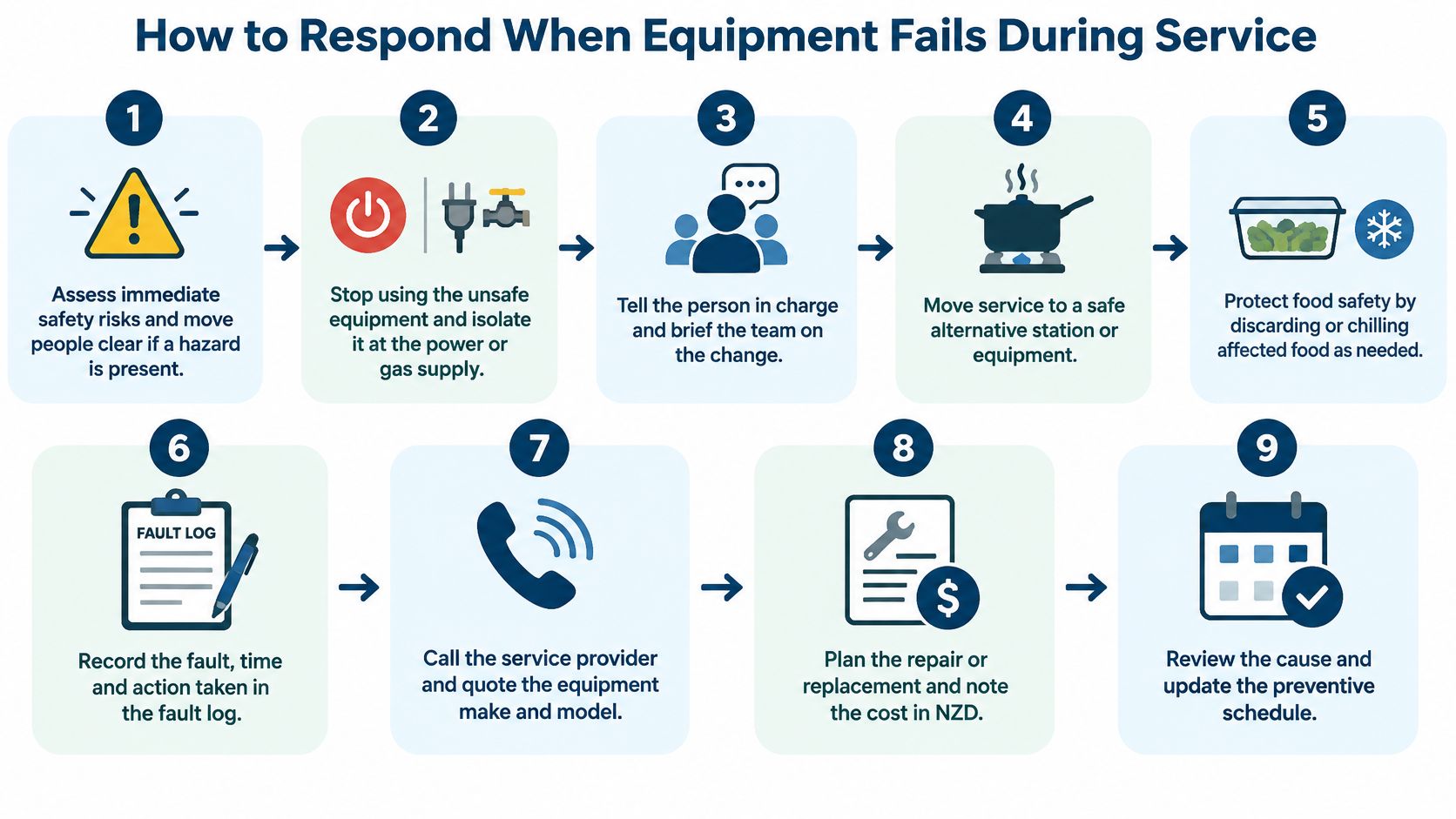
Nine steps from fault to recovery
- Check for immediate danger. If there is smoke, a gas smell, steam or water near electricity, move people clear. Stop using the equipment and isolate it only if the switch or plug is safe to reach.
- Keep clear of internal components. Check for obvious external issues such as a damaged cord, blocked ventilation or a tripped protective device. Leave panels closed. Internal testing, rewiring and three-phase diagnosis belong to a licensed electrician, as WorkSafe's guidance on prescribed electrical work explains.
- Protect the food. Probe it, move chilled stock to a working unit and quarantine anything above the applicable limits. Do not assume it will cool safely once the equipment starts running again.
- Record the symptoms. Note the appliance ID, supply type, exact error code, time of failure, whether a breaker or residual-current device operated, and any recent cleaning or water exposure.
- Check the manufacturer's manual. Use its code list and permitted operator checks. Keep the manual accessible to the team.
- Perform each permitted operator check once. Each repeat adds risk without adding information.
- Call an authorised service provider if the fault persists or needs internal work. Give them the model and displayed code so they can prepare for the call.
- Adjust the service plan. Switch to backup equipment, simplify dishes that rely on the failed machine or move prep to a quieter window. Tell front of house what the kitchen can still serve.
- Record the incident and corrective action. After repair or an authorised check, confirm the equipment's function and temperature before putting it back into service. Clean and sanitise it before use. MPI's cleaning guidance treats cleaning and sanitising as separate steps: wash with hot water and detergent, then apply a food-area sanitiser. Apply the same order to surrounding benches and food-contact surfaces.
One voice, one decision: Assign the shift leader to manage equipment status. That person decides whether a unit stays isolated or can return to use.
Repeated resets can hide a fault and make it harder to identify. Follow the earlier guidance on the repeated-reset trap rather than cycling the equipment again.
A backup plan helps limit disruption. Identify which dishes can run without the failed equipment, what backup units are available and who communicates changes to the team. Check that plan during a quiet period, before a fault tests it during service.
Deciding Whether to Repair, Replace or Keep Running
An inexpensive repair is usually the sensible call on equipment that has otherwise been reliable. Recurring failure on a machine the menu depends on is a different problem, and it justifies replacement even when the repair quote looks small in isolation.
Repair, replace or continue by situation
| Situation | Recommended consideration | Potential business impact |
|---|---|---|
| Single fault on an otherwise reliable machine | Repair if the quote and parts availability are reasonable | Short disruption and limited menu impact |
| Recurring faults on a critical machine | Compare cumulative repair spend with a replacement quote and lead time | Long downtime if it fails during peak service |
| Machine still under warranty | Check registration and claim process with the supplier before paying for repair | Could avoid out-of-pocket repair, though conditions vary |
| Spare parts unavailable or slow | Ask for the lead time before deciding | Extended outage and a need for backup equipment |
| Refrigeration cannot hold 5°C or below after checks | Stop relying on the unit, move stock and assess replacement or repair | Stock loss and food safety risk |
| Machine regularly overloaded for its workload | Consider capacity before committing to repeat repairs | Ongoing strain, frequent faults and rushed service |
What actually drives the decision
Equipment age sets the odds. Repair cost against the replacement quote is the obvious comparison, but fault frequency matters more, because three repairs in six months is a pattern rather than bad luck. Spare parts availability and lead time decide whether a repair keeps the kitchen running this week or next month, and warranty status can change the arithmetic entirely.
Warranty terms differ by manufacturer and model, so read the documentation supplied with the unit before paying for a repair, and ask Hospitality if coverage is unclear. For reference, Atosa, Jasper and Cookrite units can be registered for warranty coverage through the supplier's support page, and a customer who discovers a manufacturing defect should contact Hospitality immediately to discuss replacement. Energy use and how essential the machine is to service round out the picture.
Worked example, assumptions stated: a dishwasher has failed three times in six months, it's the only machine on site, the repair quote is NZ$450 and a replacement carries a two-week lead time.
The repair is cheaper than the replacement on paper. Compare it instead with two weeks of hired help, extra crockery and a reduced menu, and the number that matters shifts. Lost revenue is the sales not made. Lost contribution is what's left of those sales after food and packaging, and that's the figure to weigh against the quote, not the headline revenue. The figures here are illustrative, not benchmarks, and the arithmetic only works with a real quote in hand.
Where a replacement looks likely, the broader question of whether new equipment or a workflow change comes first is worth settling before signing anything. Working out whether ageing equipment is costing more than you think is the quickest way to see the full cost of holding on.
Build a Fault Log and Plan Your Next Service Call
A fault log turns an intermittent problem into useful information for the next service request. Record the date, equipment, symptom, checks completed and outcome. Add the exact error code, temperature reading or operating condition where relevant, and note whether the fault returned after a reset. Consistent entries can reveal whether the issue follows a cleaning routine, a loading pattern or a particular workload.

Troubleshooting checklist for recurring warning signs
| Warning sign | Immediate action | Follow-up required |
|---|---|---|
| Chilled unit reading above 5°C | Move stock to a working unit and quarantine it if safe limits were breached | Record readings and check seals and loading. If the temperature remains high or the fault recurs, contact a refrigeration technician |
| Same error code returning after a reset | Stop resetting the unit and record the code exactly | Check the manual and contact an authorised service provider |
| Dishes not clean or not drying over several services | Check filters, wash arms, rinse aid and dosing | Review the water supply and arrange service if the problem persists |
| Oven or fryer recovering slowly | Reduce the load and check the settings | Record when recovery is slow and arrange planned servicing if it continues |
| Unusual grinding or vibration | Stop the machine and check guards and bowl fitting only if safe | Arrange an inspection before using it again |
| Breaker tripping repeatedly | Isolate the appliance and do not reset it again | Have a qualified electrician investigate |
Before ordering a replacement part, confirm the appliance model, version and product code. Parts can appear interchangeable yet differ in lugs, clearances or airflow, creating a new fault if the wrong one is fitted.
Serviceability matters when comparing equipment. Check that the documentation, parts and support suit the workload and the consequences of downtime. Simply Hospitality stocks brands including SKOPE, Blue Seal, Cobra, Unox, Convotherm, Winterhalter, Robot Coupe and Fimar. It offers quotes, warranties and service requests, and can help with equipment selection. For help locating support, see this guide to commercial kitchen equipment service near me.
A fault log also helps the service provider understand what the equipment was doing before the failure, which checks have already been completed and whether the symptom is recurring. Keep manuals and maintenance records accessible to staff, and schedule manufacturer-recommended maintenance before busy periods where possible. For quotes, product options and finance through SilverChef, contact the team or visit Simply Hospitality.